ANALYSIS: Service Inventory
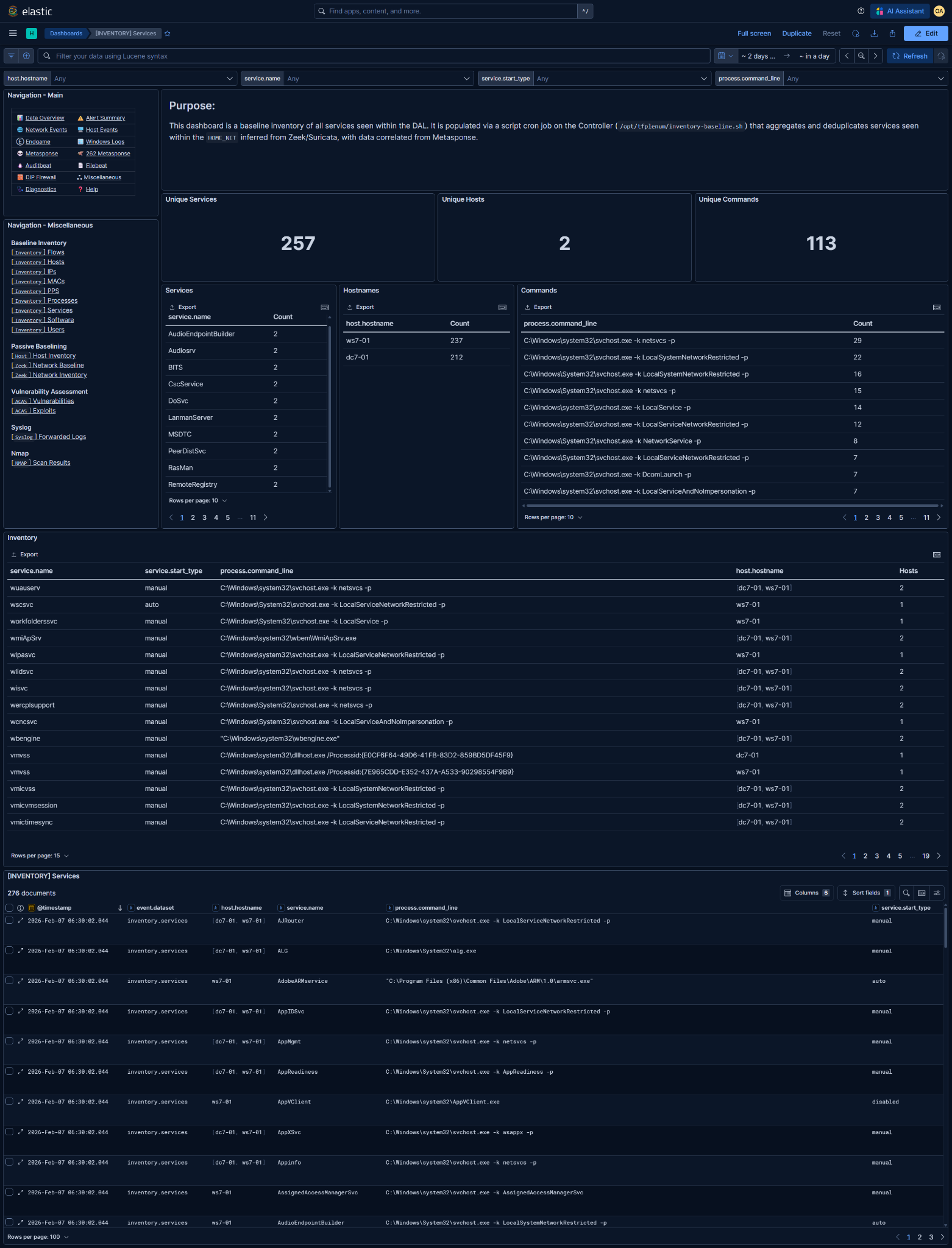
Kibana Dashboard: [INVENTORY] Services
What is this baseline?
The associated Kibana dashboard represents the baseline inventory of services observed within the DAL.
- A service entry consists of:
service.nameservice.start_type(e.g.,auto,manual,disabled)process.command_line(execution context)- One or more associated
host.hostnamevalues
- Each row answers:
"Was this service observed in the baseline inventory?"
- This is not a live service manager or configuration monitor:
- No service state (running/stopped)
- No startup timing or failure tracking
- No guarantee the service is currently enabled
- A single corroborated observation is enough to add a service to the baseline.
- Entries are deduplicated by this tuple:
service.nameservice.start_typeprocess.command_line
- Services are added when correlated to hosts within the DAL
@timestampreflects when the service was last observed and written into the baseline
Data Prerequisites
If any of these are missing or incorrect, the baseline is unreliable.
1. DAL / HOME_NET must be correct
- Derived from Zeek and/or Suricata
HOME_NET - Used to determine which hosts to use service data from
- Incorrect DAL → missing services or misattributed hosts
2. Required telemetry sources (at least one)
- Metasponse
Survey CollectorSurvey Collector262 - [💾Persistence] Services
NOTE: This dataset is heavily dependent on Metasponse coverage.
Limited or delayed collections will directly affect service visibility.
Basic Analysis Workflow
1. Baseline sanity check
Validate expected service footprint:
- Core OS services dominate the inventory
- Known line-of-business services appear
- Service counts align with host roles (server vs workstation)
- No obviously malformed or truncated command lines
Large service counts are normal. Focus on what shouldn’t be there, not volume.
2. Long-tail analysis (primary value)
Focus on unaccounted or unusual services
- Services with non-standard names
- Services with uncommon or suspicious command lines
- Services present on a single host only
Key questions
- Legitimate application or driver?
- Admin-installed tooling?
- Persistence mechanism?
- Renamed or masquerading service?
Validate against:
- Known software inventory
- Expected service lists by host role
- Vendor documentation
- Administrator confirmation if required
3. Command-line and host correlation review
Command-line analysis
- Watch for:
- Executables in user-writable paths
- Encoded or obfuscated parameters
- LOLbins hosting long-running services
svchost.exegroupings should align with known service groups
Host distribution
- Services spanning many hosts are usually OS or enterprise software
- Single-host services deserve closer inspection
Ambiguity here increases priority; it is not proof of compromise by itself.
4. Export for reporting and diffing
Reporting and documentation requirements are determined by the Mission Element Lead/Crew Lead
Common exports
- Full Inventory table (CSV)
- Service ↔ host ↔ command-line mapping
- Auto-start service subset
NOTE: These exports represent the declared service baseline for the mission period.
5. Enable baseline deviation detection rule
Enabling too early guarantees noise - it will alert on ALL new inventory additions after enablement.
Detection rules can be managed in Kibana under Security → Rules
Rule: [262][Inventory] New service added to baseline
- Detection logic:
Alert when a new service within the DAL is added to the baseline inventory
- Only enable after:
- Baseline window is complete
- Expected services are fully observed
- Long-tail service review is finished
- Ongoing alert tuning:
- Whitelist known installers and update-created services
- Suppress expected mission-support tooling
- Validate whether the service introduces new persistence or capability
This rule is intended to catch:
- Unauthorized persistence mechanisms
- Backdoored or masquerading services
- Misconfigurations introducing new auto-start behavior